WhatsApp Bulk Messaging and Marketing: A Complete Guide
A complete guide to WhatsApp bulk messaging and marketing — covering the Business App vs API, template rules, the 24-hour window, costs, safety tips, and best practices to run high-ROI campaigns without getting banned.
Listen to Article (Audio Reader)AI Voice
Listen in human-like voice while multitasking
WhatsApp has over 2 billion users, making it the most widely used messaging app in the world. For businesses, it's not just a communication channel — it's a massive marketing platform. However, WhatsApp bulk messaging isn't as simple as copy-pasting a message to hundreds of people. Do it wrong, and your account gets banned and your marketing falls flat. This guide covers the correct methods, tool choices, costs, and best practices.
https://watsalead.in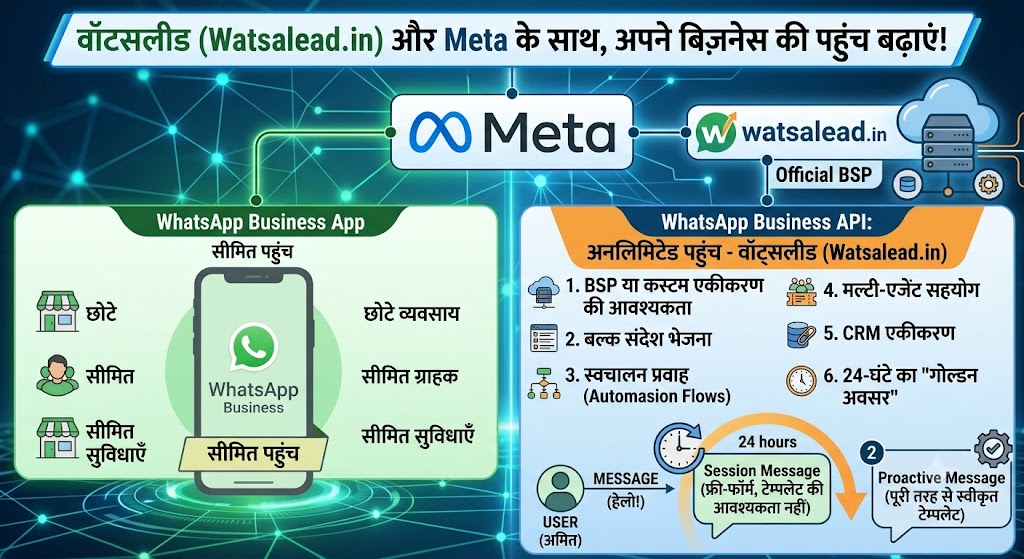
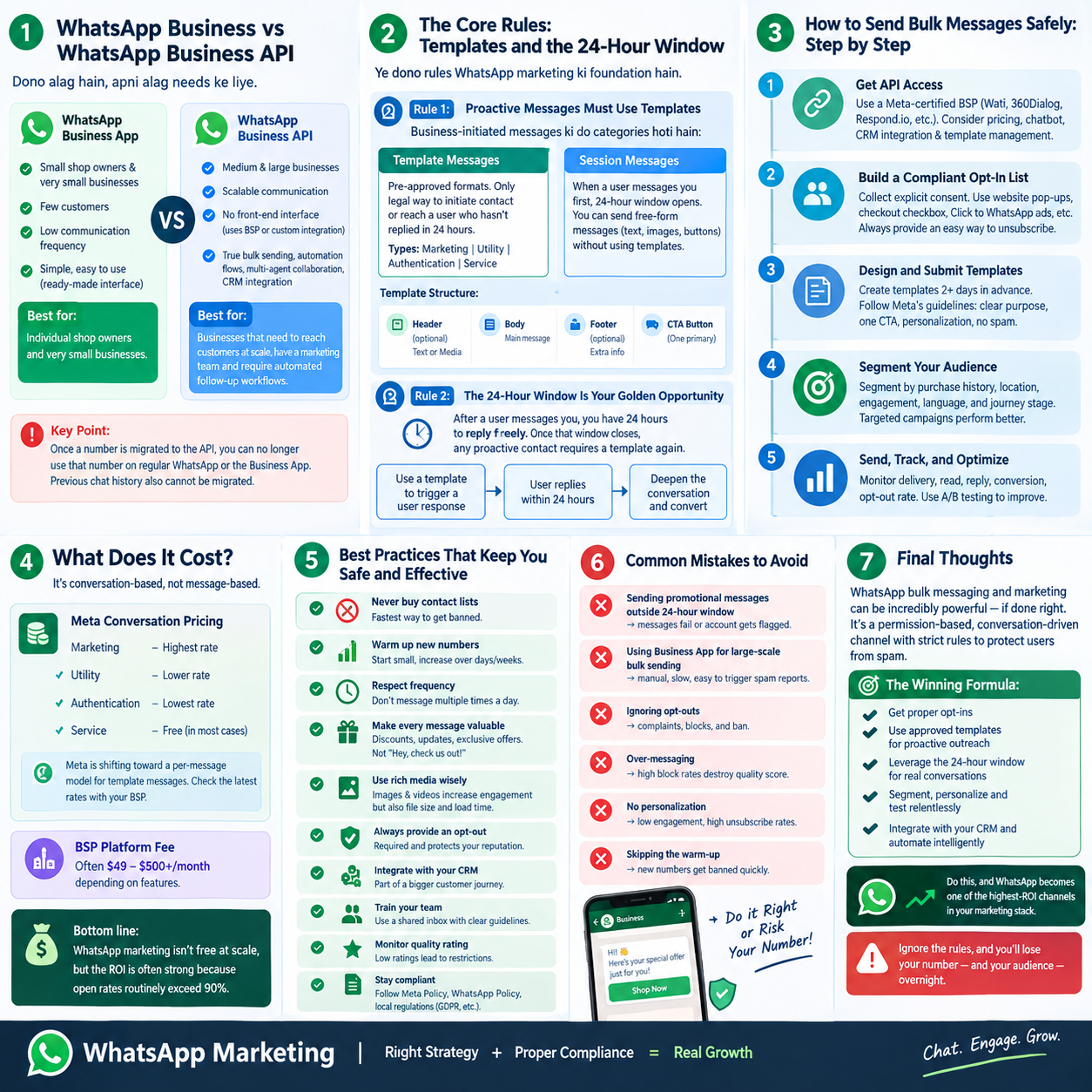
1. First, Understand: Business App vs. API
Many people confuse the two available WhatsApp business tools. Meta actually offers two very different paths:
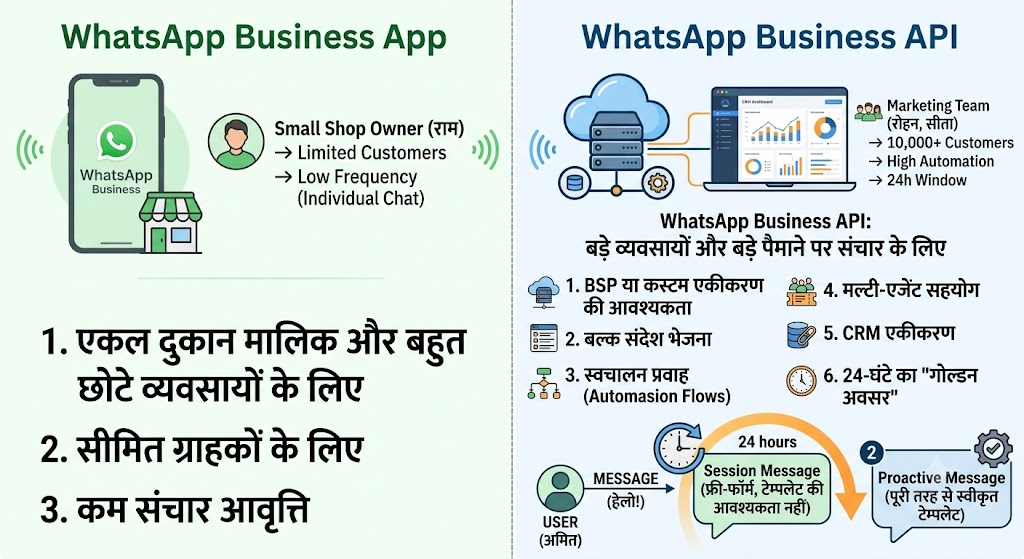
WhatsApp Business App (Free)
This is Meta's free app for small merchants. It supports a basic product catalog, automated replies, and quick replies. But its bulk messaging capability is extremely limited: broadcast lists can only hold up to 256 contacts, you cannot import contact lists for bulk sending, and everything is done manually.
Best for: Individual shop owners and very small businesses with few customers and low communication frequency.
WhatsApp Business API
The API is designed for medium and large businesses that need scalable communication. It has no front-end interface — you use it through a Business Solution Provider (BSP) or a custom integration. The API supports true bulk sending, automation flows, multi-agent collaboration, and CRM integration.
Best for: Businesses that need to reach customers at scale, have a marketing team, and require automated follow-up workflows.
Key point: Once a number is migrated to the API, you can no longer use that number on regular WhatsApp or the Business App. Previous chat history also cannot be migrated.
2. The Core Rules: Templates and the 24-Hour Window
These two rules are the foundation of all WhatsApp marketing. If you don't understand them, everything else falls apart.
Rule 1: Proactive Messages Must Use Templates
WhatsApp divides business-initiated messages into two categories:
Template Messages: Pre-approved message formats. This is the only legal way for a business to initiate contact or reach a user who hasn't replied within 24 hours. Templates fall into four categories: Marketing, Utility, Authentication, and Service.
Session Messages: When a user messages you first, a 24-hour "customer service window" opens. During this window, you can send free-form messages (text, images, buttons, etc.) without using templates.
Template structure typically includes: an optional header (text or media), a body, an optional footer, and one primary call-to-action button.
Rule 2: The 24-Hour Window Is Your Golden Opportunity
After a user messages you, you have 24 hours to reply freely. Once that window closes, any proactive contact requires a template again.
This means an efficient WhatsApp marketing flow should be: Use a template to trigger a user response → user replies within 24 hours → deepen the conversation and convert during the open window.
3. How to Send Bulk Messages Safely: Step by Step
Step 1: Get API Access
You need to access the WhatsApp Business API through a Meta-certified BSP (Business Solution Provider). Common BSPs include Wati, 360Dialog, Respond.io, and others. When choosing a BSP, consider: monthly fee structure, whether a chatbot is included, CRM integration capability, and how robust the template management tools are.
Step 2: Build a Compliant Opt-In List
This is the most important step. WhatsApp strictly prohibits sending marketing messages to users who haven't subscribed (cold outreach). Your contact list must consist of users who have explicitly agreed to receive messages.
Common ways to collect opt-ins include: a checkbox at checkout, a website pop-up, "Click to WhatsApp" ads, and more. Every marketing message should include an easy way to unsubscribe, and opt-out requests must be processed immediately.
Step 3: Design and Submit Templates
Templates must be created at least 2 business days in advance and submitted to Meta for review (usually approved within 24 hours).
Template writing tips:
State the purpose clearly in the first line; avoid misleading language
Use one primary CTA — don't stack multiple buttons
Personalize with variables (name, order number, etc.)
Keep marketing templates genuinely valuable, not spammy
Follow Meta's commerce policy and content rules
Step 4: Segment Your Audience
Never blast the same message to your entire list. Segment by:
Purchase history
Location
Engagement level
Language preference
Stage in the customer journey
Segmented campaigns consistently outperform generic blasts in both response rate and conversion.
Step 5: Send, Track, and Optimize
Monitor key metrics:
Delivery rate — did the message arrive?
Read rate — how many opened it?
Reply rate — how many responded?
Conversion rate — how many took the desired action?
Opt-out rate — if this is high, your content or frequency is the problem
Use A/B testing on headlines, CTAs, and send times to continuously improve.
4. What Does It Cost?
WhatsApp API pricing is conversation-based, not message-based. You pay per 24-hour conversation window, and rates vary by country and category:
Marketing conversations — highest rate
Utility conversations — lower rate
Authentication conversations — lowest rate
Service conversations — free in most cases (user-initiated)
As of recent Meta updates, pricing is shifting toward a per-message model for template messages, so check the latest rates with your BSP. On top of Meta's fees, your BSP charges a platform fee (often $49–$500+/month depending on features).
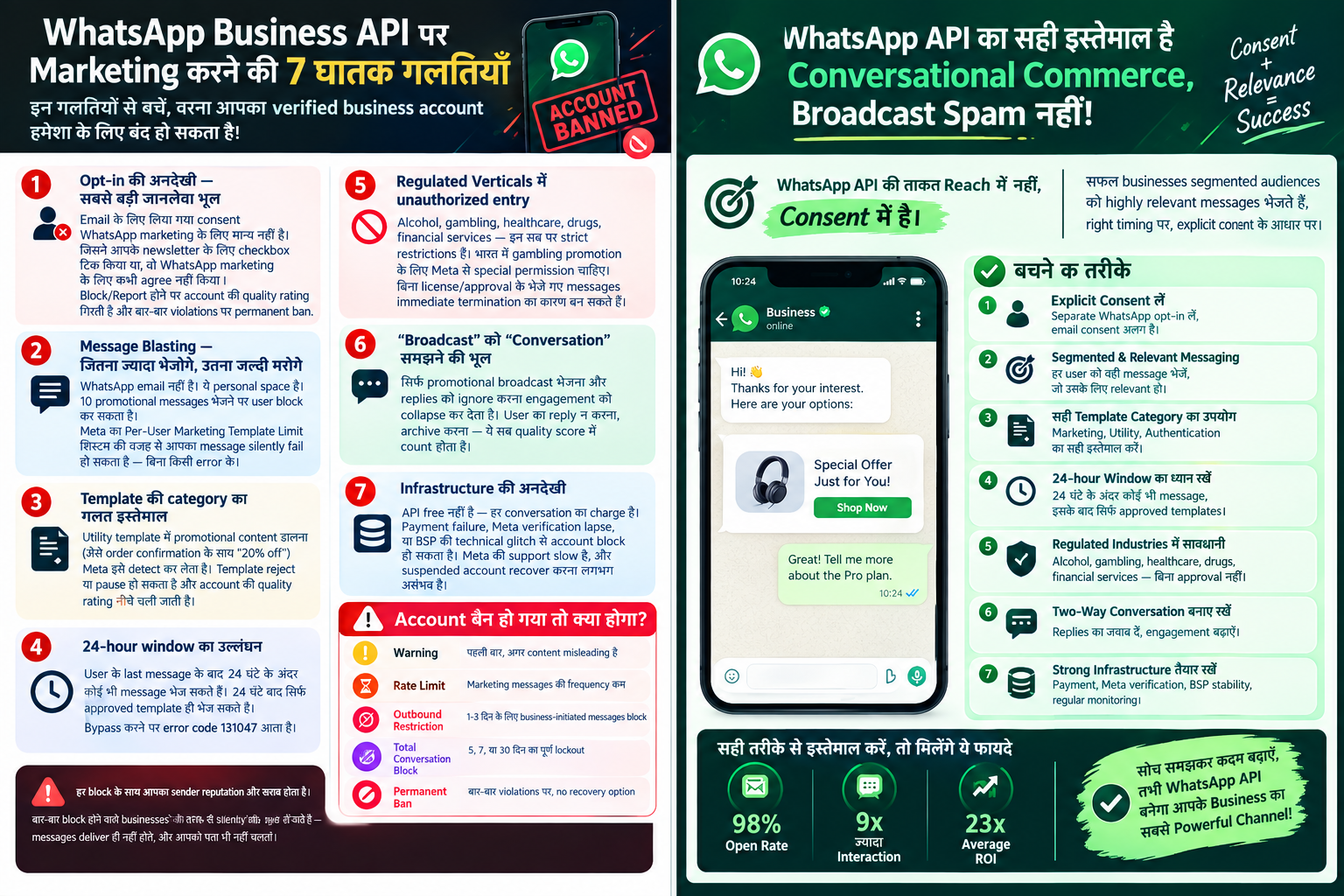
Bottom line: WhatsApp marketing isn't free at scale, but the ROI is often strong because open rates routinely exceed 90%.
5. Best Practices That Keep You Safe and Effective
Never buy contact lists. This is the fastest way to get banned.
Warm up new numbers gradually. Start with small volumes and increase over days/weeks.
Respect frequency. Don't message the same user multiple times a day.
Make every message valuable. Discounts, order updates, exclusive offers — not "Hey, check us out!"
Use rich media wisely. Images and videos increase engagement but also file size and load time.
Always provide an opt-out. It's required and it protects your sender reputation.
Integrate with your CRM. WhatsApp works best as part of a broader customer journey, not in isolation.
Train your team. If multiple agents reply, use a shared inbox with clear guidelines.
Monitor quality rating. Meta assigns your number a quality rating; low ratings lead to restrictions.
Stay compliant. Follow Meta's Commerce Policy, WhatsApp Business Policy, and local regulations (GDPR, etc.).
6. Common Mistakes to Avoid
Sending promotional messages outside the 24-hour window without a template → messages fail or account gets flagged
Using the Business App for large-scale bulk sending → manual, slow, and easy to trigger spam reports
Ignoring opt-outs → complaints, blocks, and eventually a ban
Over-messaging → high block rates destroy your quality score
No personalization → low engagement, high unsubscribe rates
Skipping the warm-up → new numbers get banned quickly
7. Final Thoughts
WhatsApp bulk messaging and marketing can be incredibly powerful — if done right. The key is understanding that WhatsApp is not email. It's a permission-based, conversation-driven channel with strict rules designed to protect users from spam.
The winning formula is:
Get proper opt-ins
Use approved templates for proactive outreach
Leverage the 24-hour window for real conversations
Segment, personalize, and test relentlessly
Integrate with your CRM and automate intelligently
Do this, and WhatsApp becomes one of the highest-ROI channels in your marketing stack. Ignore the rules, and you'll lose your number — and your audience — overnight.
More Articles You Might Like
Why Most Businesses Are Still Sleeping on WhatsApp (And How to Wake Up Before It's Too Late)

The Complete Guide to WhatsApp Lead Generation: From Conversation to Conversion